Paper Timer
A Timer for Readers
Request features and report bugs on Github issues
Why Paper Timer
Paper timer makes your reading more efficient and stress-free.
It’s more than a timer to track time; it’s a simple and yet powerful tool to let you experiment with methods of reading that suit you and turn them into habits.
Paper Timer is completely free. It’s made by an academic for academics.
See:
- design philosophy to learn more about why Paper Timer is different.
- example item to see to utilize the
stagesanditemsto help you read. - use cases a list of scenarios where Paper Timer can help you.
- inspirations for works that shaped the conceptualization of the timer.
- FAQ for common and not so common questions.
- possible issues to learn about known issues.
- support if you like and want to support Paper Timer
- change log for changes.

Downloads
Windows x64
Last update: 2022-07-21
| ver. | installer |
|---|---|
| 0.1.1 | Paper.Timer_0.1.1_x64_en-US.msi |
macOS
Last update: 2022-07-21
| ver. | installer |
|---|---|
| 0.1.1 | Paper.Timer_0.1.1_universal.dmg |
- Universal version, notarized.
Linux
Upcoming
Usages
Some typical scenario where using Paper Timer makes a difference:
- literature review
- where you need to go through many readings quickly and multiple times: the first time you filter out relevant ones by scanning them, and the second time you read the important items more thoroughly etc..
-
class reading assignments
- When you have to read x number of books in y amount of time.
-
Ph.D comprehensive exam preparation.
- A combination of the above two and more intense.
-
Routine news or journal reading sessions to keep up with the art of the field.
- You have 2 hours to spend in the morning. How many things can you read?
-
Train yourself to be a better reader
- Trying different reading strategies that work for you, implemented as configurations of stages and items, and form good reading habits.
Check out the demo item below (coming with Paper Timer), experiment with your own, and make changes to your stages as you use the timer.
Features
- Easy reading
itemandstageorganizations. See terms section for their definition.

- Extremely helpful voice notifications of reading progresses. If you don’t like them, you can mute it in settings.
- But I strongly recommend keeping them on, so you don’t have to check Paper Timer and can keep it minimized and focus on the reading.
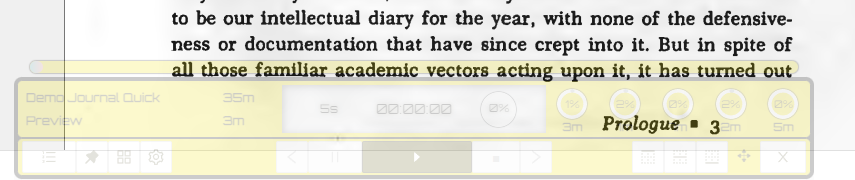
- Pleasant sound effects for background and stage and item endings. Differential clock sound let you easily know where you are and how much time left. Also mutable.

- Easily stick to the top or bottom of the screen while you’re reading.

- Unobtrusive: becomes half transparent automatically when you’re reading on the screen.
- And more in roadmap.
Example
-
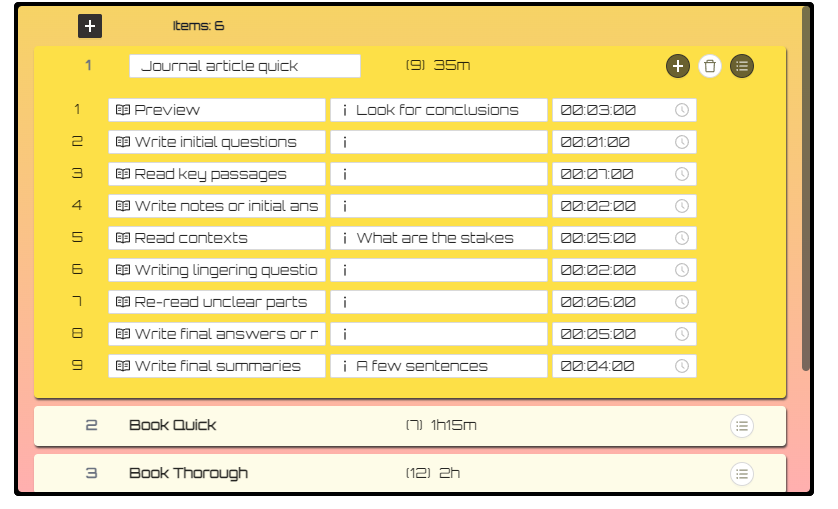
A demo item called
Demo Journal Quickis included in the Paper Timer. You can get a sense what a typical item with its stage arrangement should look like. - The reading is divided into four phases:
previewreading key passagesand reading contextsandre-reading unclear parts.
-
The reading phases are separated from each other with writing stages, where you write your questions, thoughts. These are also moments for reflections.
-
The second column is for notes or remainders about what this stage is supposed to do. For example, for the
previewstage, you should “look for conclusions” etc. - Remember to include key words in your item name,
Journal article quickin this case, to indicate both- the nature of the item (“journal article”) and
- the method (“quick”).
Design philosophy
The design philosophy of Paper Timer holds true three principles about reading:
Iterate: read it multiple times
- Reading the same material multiple times, each time focusing on different tasks, is better than reading in one go and from cover to cover, which is always the worst way to read academic literature even if you have the time, unless you’re reading pure narratives.
Be selective: focus on key parts
- Reading is an never ending process. You can turn the necessary incompleteness to a positive selectivity by reading the key parts actively within time limits.
Space: leave time to reflect and write
- Reading with questions makes active reading easier. Starting to write down thoughts, especially questions, during the reading process, not after, will increase dramatically increase your comprehension.
Terms
- Item
- An item to read using a certain method.
-
E.g., a reading item could be a journal article, or a section of a paper you want to write.
-
However, an item in Paper Timer also means a method or a situation.
-
Sometimes you want to skim an article, sometimes you want to read thoroughly, and sometimes you are pressed with time but still want to take most our of the article with all the time you have. The “situation” is crucial for item.
-
E.g., for an average journal article, say 25-45 pages, you can create three
items: (1) an item called “Journal article scanning” (which takes 2stagesand 5 minutes to read in total), (2) “Journal article close reading” (which takes 6stagesand 40 minutes), and (3) “Journal article fast reading (which also takes 6stagesbut only 25 minutes). - Stage
- A step in an
item. Ideally, should focus on only one task. - E.g. during the “previewing”
stage, look only for the central argument; and then during the “reading for evidence”stage, try to identify the key evidence the author provided for the previous argument.
Configurations
- You can adjust the setting and export and import user data in
settings.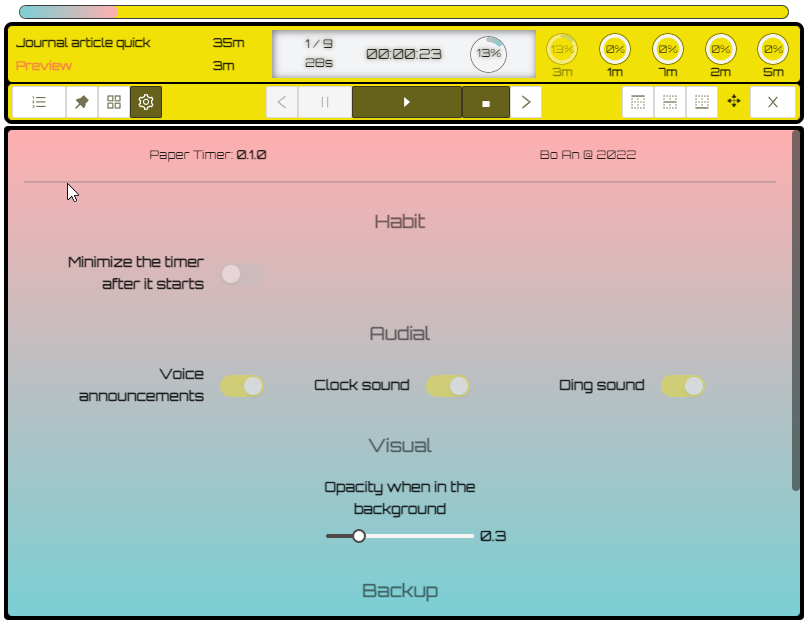
Inspirations
It’s been many years since I started to use similar practices in my reading. The inspirations are many and many of their ideas are reflected in the Paper Timer. This is no ads–no referral links or anything, just recommendations and acknowledge..
- How to Read a Book by Paul Edwards
- A super useful and succinct guide for academic reading.
- Download the pdf guide here.
- Andrew Abbott’s Digital Paper
- An original and comprehensive guide not just on reading but on doing library-based research in general.
- How to Read a Book: The Classic Guide to Intelligent Reading by Mortimer J. Adler and Charles Van Doren
- A classic on reading methods. Read this as an undergrad and it changed my life. A bit dated and geared more towards general readers but still extremely useful and inspiring.
- The Power of Reading: Insights from the Research by Stephen Krashen
- A classic on language acquisition through free voluntary reading–Not exactly the same as the kind of targeted and controlled reading promoted by Paper Timer though.
FAQ
Q: Is Paper Timer a productivity tool? How is it different from popular productivity timers such as Pomodoro timers or time trackers
- Yes and no! One lesson I learned from my academic studies is that, when it comes to Research software, a lot of things are missing in common productivity tools. A generic tool is OK for everyone but great for no one. Compared to Pomodoro timers and focus trackers, for example, Paper Timer allows you not only to decide how much time you will spend, but also how you will spend them, stage by stage. The difference seems small but the implication is huge. My best advice is try using Paper Timer and Pomodoro for reading and feel the difference by yourself. You’ll love it.
Q: What do you mean by “Paper Timer makes you stress-free”?
- When you have to finish 12 articles in 6 hours, if you’re not carefully, you can easily overspend time on some of the readings and leave others little time to go over. You will be stressed, not knowing how much time you should spend on each and not knowing when you will finish. Using Paper Timer will not make these problems magically disappear, but trust me it will make reading so much more enjoyable and it incredibly easy to focus even when you have hard deadlines ahead.
Q: Is Paper Timer free?
- Yes. I was tempted to charge a small amount of fee for Mac users because Apple charges me $99 a year just to allow me to notarize it; but I decided against it. I might consider donation options later.
Q: Is Paper Timer great for all reading scenarios?
- Absolutely not. In my years of using timers of this kind which I built, I often found scenarios where I need to pause the timer, so I can spend more time on something until I’m ready to move on, rather than following the predefined stages. And sometimes, especially after you have internalized the staged reading techniques, you might be even more productive reading without Paper Timer. Paper Timer shouldn’t be a prison house; it’s a scaffold.
Q: What’s background sound?
- It’s a free sound recording of a summer night in a Japanese temple.
Q: What’s the ding sound?
- The “ding” sound you hear at the end of an item–after all stages have ended–is the sound of a Tibetan singing bowl. Soothing huh?
Possible issues
- If you toggle the profile view (the first button to the left) while the timer is running, there is a chance the timer is stuck. Restart the timer solves the issue.
Bugs and features
If you encounter bugs or want to suggest features, please use the issues.
Support
Paper Timer is free. If you hope to support the development, you can
- report bugs and make suggestions using the issues.
- spread the word and recommend Paper Timer to others!
Roadmaps
- Multi-lingual support
- Multiple profiles
- Linux version
- Quick note
Changelog
[0.1.1] - 2022-07-21
Added
- Demo item to help new users to get familiar with using
stages. - Universal app for Mac users.
- Adjusted stage information display for make it easier to tell the current item and stages.
- Option to clear user data and reset.
[0.1.0] - 2022-07-19
- First release
…
[0.0.1] - 2016-01-11
- First reading timer prototype built during my second semester in graduate school. Some of the sound you hear in the current version, such as the background and ticking sounds are from back then. I can write about the evolution of this timer in relation to my study at a later point.